An AI slides generator is a tool that uses artificial intelligence to create presentation slides from a prompt, outline, document, or raw content. Instead of manually writing every slide, choosing layouts, and formatting the deck, you can ask the AI to generate a first draft for you.
The best AI slide generators do more than place text on slides. They help with structure, storytelling, layout, visual hierarchy, and sometimes even image generation. For business users, the most important factors are usually editable PPT export, professional design, content quality, and whether the deck is actually usable in a real meeting.
Table of Contents
1. Dokie AI
Best for: Business-ready AI presentations and editable PPT decks
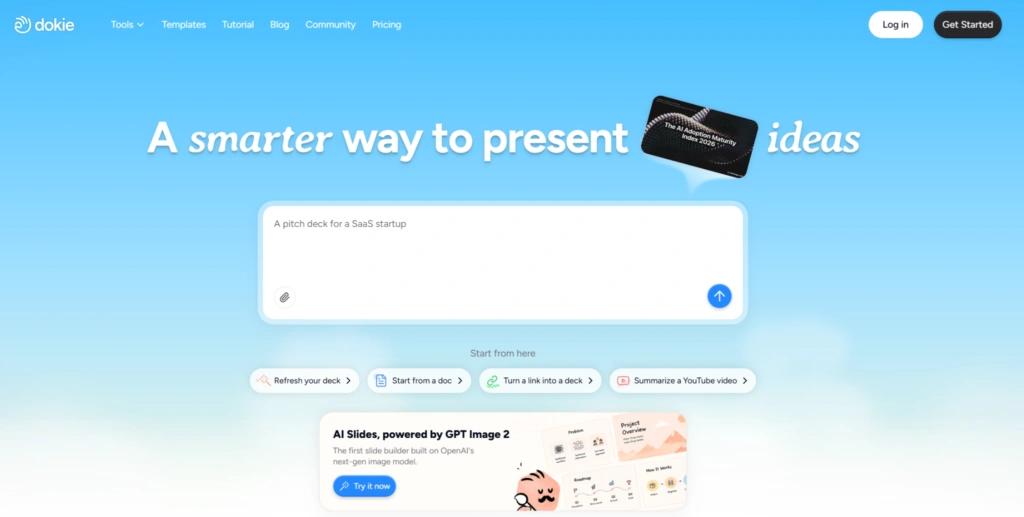
Dokie AI is an AI presentation maker designed for users who need clean, structured, and editable slide decks. It is especially useful for business reports, marketing updates, pitch decks, client presentations, internal training materials, and professional meeting slides.
What makes Dokie AI stand out is its focus on real presentation workflows. Some AI presentation tools create beautiful web-style documents, but they may require extra work when you need a traditional PowerPoint deck. Dokie AI is better suited for users who want to generate a complete presentation, review the structure, edit key slides, and export the final version as a PowerPoint file.
Also Read


Dokie AI is a strong choice for marketers, founders, consultants, sales teams, educators, and anyone who regularly creates slides for work. It helps reduce the blank-page problem by giving users a solid first draft with clear sections, slide titles, and visual structure.
Key features:
Dokie AI can generate full presentations from prompts or content input. It supports business-focused slide creation, editable deck workflows, and polished visual layouts. It is also useful for users who want to create presentations faster without losing control over the final result.
Why choose Dokie AI:
Choose Dokie AI if you want an AI slides generator that feels close to a real PowerPoint workflow. It is especially valuable when you care about structure, editability, and professional presentation quality.
2. Gamma
Best for: Visual storytelling and web-style presentations
Gamma is one of the most popular AI presentation makers. It allows users to create presentations, documents, and even websites from prompts. Gamma’s official site describes it as an AI-powered design tool for presentations, websites, documents, and social media content, with export options including PPT and PDF.
Gamma is great for users who want a modern, visual, and interactive presentation experience. The output often feels more like a polished digital document than a traditional slide deck. This can be a strength if you are sharing content asynchronously or creating a narrative-style presentation.
However, if your final goal is a highly editable traditional PowerPoint file, you may still need to review the exported file carefully. Gamma is excellent for fast ideation and visual storytelling, but some business users may prefer a tool that is more focused on standard PPT workflows.
Key features:
Gamma can turn ideas into slide decks, documents, and websites. It supports visual layouts, AI-generated structures, and multiple export formats.
Why choose Gamma:
Choose Gamma if you want beautiful, modern, web-style presentations and do not need every deck to follow a traditional PowerPoint format.
3. Canva AI Presentation Maker
Best for: Design flexibility and branded presentations
Canva’s AI presentation maker, Magic Design for Presentations, lets users type a prompt and generate a draft presentation with content and design. Canva positions the tool as a way to create professional draft presentations quickly and then customize them with templates, branding, and design assets.
Canva is ideal for users who care about visual design. Its biggest advantage is the huge design ecosystem. You can use templates, graphics, images, icons, brand kits, and other creative assets to polish your slides.
For marketers, creators, social media teams, and small businesses, Canva is one of the most flexible AI slide tools. It may not always generate the most business-logical deck structure, but it gives you a lot of control over the final visual result.
Key features:
Canva offers AI presentation generation, templates, brand kits, stock assets, visual editing, and collaboration features.
Why choose Canva:
Choose Canva if you want an AI slides generator with strong design tools and easy customization.
4. Beautiful.ai
Best for: Consistent team presentations
Beautiful.ai is a presentation platform focused on smart slide design and brand consistency. Its website highlights AI-assisted slide creation, PowerPoint import/export, and sharing in formats such as PPTX and PDF.
The main advantage of Beautiful.ai is that it helps teams create consistent-looking decks. Its smart slide system keeps layouts clean and prevents users from accidentally breaking the design. This is useful for sales teams, marketing teams, and companies that need everyone to follow a similar visual style.
Beautiful.ai may feel less flexible than traditional PowerPoint, but that is also part of its value. It keeps presentations polished and on-brand without requiring every user to be a designer.
Key features:
Beautiful.ai offers AI-assisted presentation creation, smart layouts, team templates, brand controls, and PowerPoint export.
Why choose Beautiful.ai:
Choose Beautiful.ai if your team needs consistent, professional slides and you want design guardrails built into the workflow.
5. Tome
Best for: Narrative presentations and idea storytelling
Tome is an AI-powered storytelling and presentation tool. It is useful for turning ideas into visual narratives, product stories, startup concepts, and creative pitches.
Compared with traditional slide generators, Tome often feels more like a storytelling canvas. It is good for creating a flow around an idea, especially when the presentation is meant to be read or shared online. This makes it useful for founders, creators, product teams, and educators who want to explain a concept visually.
However, Tome may not be the best option if you need a traditional corporate deck with strict formatting and editable PowerPoint output. It is better for narrative-first content than for formal business reporting.
Key features:
Tome helps users generate narrative-style presentations, visual stories, and idea-driven decks.
Why choose Tome:
Choose Tome if your priority is storytelling, concept explanation, or visually presenting an idea in a modern format.
6. SlidesAI
Best for: Google Slides users
SlidesAI is designed for people who want to create presentations inside Google Slides. This makes it convenient for users who already collaborate in Google Workspace.
The main benefit of SlidesAI is workflow simplicity. Instead of switching to a separate platform, users can generate slide content directly inside the tool they already use. It is especially useful for students, teachers, marketers, and business users who need quick slide drafts.
SlidesAI may not offer the same level of design polish as some dedicated presentation platforms, but it is practical for fast slide generation and Google Slides-based collaboration.
Key features:
SlidesAI can generate slides from text, summarize content, and help users create Google Slides presentations faster.
Why choose SlidesAI:
Choose SlidesAI if your team mainly works in Google Slides and you want a lightweight AI assistant for creating presentation drafts.
7. Plus AI
Best for: PowerPoint and Google Slides workflows
Plus AI is another strong option for users who want AI presentation generation inside familiar tools like PowerPoint and Google Slides. It focuses on helping users create, rewrite, and format presentations without leaving their existing workflow.
This makes Plus AI useful for business users who do not want to learn a completely new presentation platform. You can use AI to generate slides, improve existing decks, rewrite content, and adjust slide structure.
Compared with tools that create standalone AI presentations, Plus AI is more workflow-focused. It is a good choice for people who already have existing slide templates or internal formats.
Key features:
Plus AI supports AI slide generation, rewriting, formatting, and integration with common presentation workflows.
Why choose Plus AI:
Choose Plus AI if you want AI assistance inside your existing PowerPoint or Google Slides process.
8. Microsoft Copilot for PowerPoint
Best for: Microsoft 365 users
Microsoft Copilot for PowerPoint is a natural option for users who already work inside Microsoft 365. Microsoft describes Copilot in PowerPoint as a way to create and edit professional-looking presentations with AI, including prompt-based slide creation and editing support.
The biggest advantage of Copilot is that it works directly within PowerPoint. For corporate users, this matters because many teams already use Microsoft 365 for documents, meetings, email, and presentations.
Copilot is especially useful when your content already lives in Word documents, meeting notes, or internal Microsoft files. It can help turn existing material into slides and assist with editing.
However, Copilot may be more dependent on your Microsoft 365 setup, and it may not feel as specialized as standalone AI presentation tools. Still, for PowerPoint-heavy teams, it is one of the most convenient choices.
Key features:
Microsoft Copilot supports AI-assisted PowerPoint creation, editing, rewriting, and integration with Microsoft 365 content.
Why choose Microsoft Copilot:
Choose Microsoft Copilot if your company already uses Microsoft 365 and you want AI slide generation inside PowerPoint.
How to Choose the Best AI Slides Generator
The best AI slides generator depends on your workflow.
If you need business-ready, editable PowerPoint decks, Dokie AI is a strong choice. It is built around practical presentation creation rather than just visual experimentation.
If you want modern, web-style storytelling, Gamma is a good option. If design flexibility matters most, Canva is hard to beat. If your team needs consistent branded decks, Beautiful.ai is worth considering. If you work mainly in Google Slides, SlidesAI or Plus AI may fit better. If your company already uses Microsoft 365, Copilot is the most natural option.
For most users, the key question is not simply “Which tool creates the prettiest slides?” The better question is: “Which tool creates slides I can actually use, edit, present, and share?”
Final Verdict
AI slides generators are no longer just simple text-to-slide tools. The best ones can help users build complete presentations, organize ideas, improve design, and save hours of manual work.
For business users, Dokie AI is one of the best AI slides generators because it focuses on structured, editable, and professional presentation decks. Gamma and Canva are excellent for visual creation, Beautiful.ai is strong for team consistency, and Microsoft Copilot is convenient for PowerPoint users.
If you create presentations regularly, using an AI slides generator can make your workflow much faster. Instead of starting from a blank page, you can generate a strong first draft, refine the message, and focus more on the actual presentation.