Whenever you browse the clothing category in the Roblox Marketplace, you will see many subcategories. Among them, you will find classic T-shirts, shirts and pants, which have a separate fanbase of their own. But what exactly is classic clothing and why do players, especially old-school players, prefer this clothing over others? Let us explore in this guide.
Table of Contents
What Is Classic Clothing in Roblox
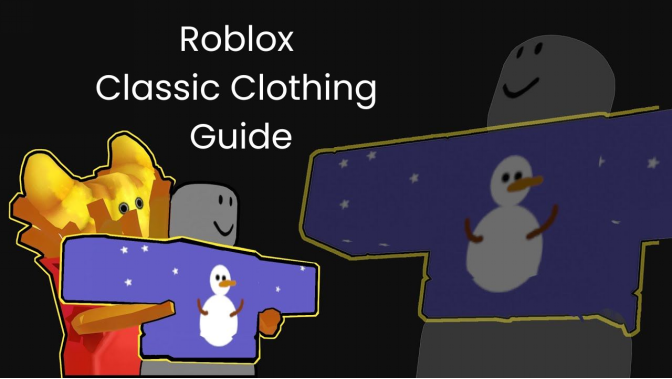
Classic clothing is the simplest and most basic type of outfit. Since classic clothing uses 2D, they are mostly flat images wrapped around the avatar. Anyone with a little experience in image editing can create and sell them on the marketplace to make money.
Among these, classic T-shirts have high demand. Making a classic T-shirt is the easiest option and you can buy them for as little as 2 Robux. These T-shirts are created by the community and uploaded to the marketplace for everyone to buy.
Classic clothing is available at very cheap prices. These clothes have been available in the marketplace for a very long time and they fit perfectly well on all R6 avatars. This is why classic clothing is popular among many players, especially veterans. If you are also a fan of limited and rare skins, you can explore u7buy.com, which offers accounts with rare items and classic cosmetics.
Types of Classic Clothing
There are three types of classic clothing: classic T-shirts, classic shirts and classic pants. Among these, classic T-shirts are the easiest to create. If you are a complete beginner, start with T-shirts. In this guide, I will also discuss how you can create your first classic T-shirt and upload it to the marketplace.
Also Read


● Classic T-Shirts: T-shirts are a simple square image. You can design a T-shirt to display any image on the front side of your character’s torso.
● Classic Shirts: Classic shirts are also images that wrap around the avatar, mainly the torso and arms. They are not as simple as a T-shirt. Shirts offer better detailing and instead of showing a single image, you can customize the clothing more with classic shirts.
● Classic Pants: Similar to classic shirts, classic pants are also images but they wrap around the torso and legs.
To summarize, classic T-shirts display a simple image only on the front. Classic shirts and pants wrap around the torso and arms or torso and legs, allowing you to add details to the top, bottom, front, back, right and left sides of an avatar.
How Classic Clothing Works: Templates Explained
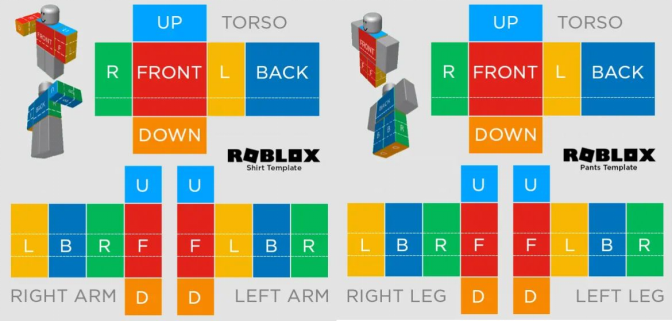
Starting with classic T-shirts, they use a simple square image with a size of 512×512 pixels. You just upload an image and it will display on the front of the torso as the design.
When it comes to classic shirts and pants, Roblox provides official templates. Take a look at the image above to understand this better.
Let us take the classic shirt template as an example. In this template, you have three parts. One for the torso, one for the right arm and one for the left arm.
The torso has front, back, up, down, right and left sides that fully surround the avatar’s torso.
● The front and back use a pixel size of 128×128. This is also called a large square.
● The sides of the torso, shown as R and L, are called tall rectangles and they use 64×128 pixels.
● The top and bottom complete the torso. These are called wide rectangles and they use 128×64 pixels.
The right arm and left arm also use the same shapes and sizes. These shapes are universal and are also used to create classic pants, which include the torso and legs.
Roblox Classic Shirts Template
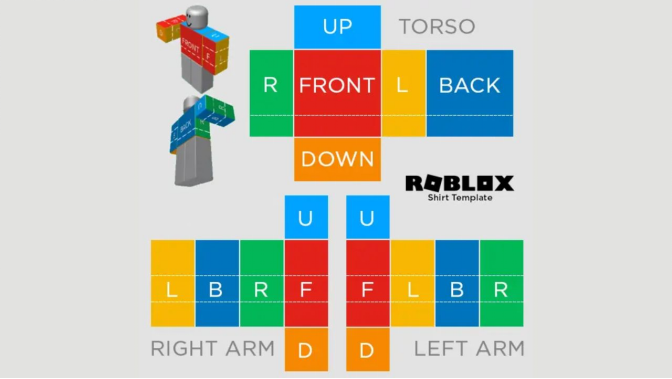
| Torso and Arms | Shape | Size |
| Front and Back of Torso | Large Square | 128×128 |
| Right and Left of Torso | Tall Rectangle | 64×128 |
| Up and Down of Torso | Wide Rectangle | 128×64 |
| Front, Back, Right and Left of Arms | Tall Rectangle | 64×128 |
| Up and Down of Arms | Small Square | 64×64 |
Roblox Classic Pants Template
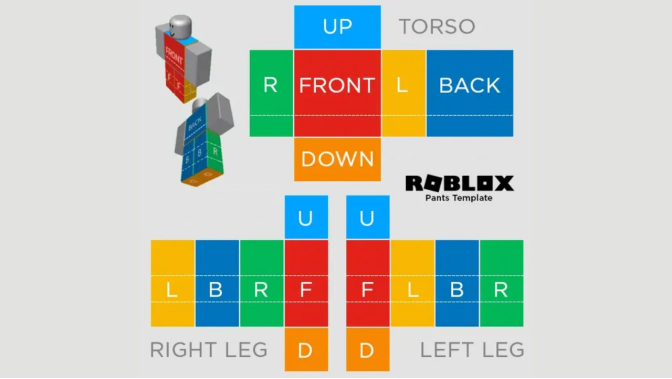
| Torso and Legs | Shape | Size |
| Front and Back of Torso | Large Square | 128×128 |
| Right and Left of Torso | Tall Rectangle | 64×128 |
| Up and Down of Torso | Wide Rectangle | 128×64 |
| Front, Back, Right and Left of Legs | Tall Rectangle | 64×128 |
| Up and Down of Legs | Small Square | 64×64 |
Classic Clothing vs Layered Clothing
By now, you must have understood classic clothing in detail. Now let’s compare it with layered clothing, which is also known as 3D clothing.
Unlike classic clothing, layered clothing are 3D cosmetic items that are much more detailed.
Layered clothing is available for many items, such as T-shirts, pants, jackets, dresses and more. Classic clothing is only available for T-shirts, shirts and pants.
Layered clothing is hard to design. For this, you need knowledge of 3D modeling tools like Blender. Whereas, anyone with a little experience in image editing can create classic clothing.
Classic clothing is available at very cheap prices. Layered clothing is more expensive when compared to classic clothing.
Classic clothing is a simple concept. Layered clothing is much more detailed and needs more experience. If you are a beginner, it is recommended to start by creating a classic T-shirt, then try a classic shirt or pant, and later learn 3D modeling to move into layered clothing.
How to Make a Classic T-Shirt in Roblox
Since a classic T-shirt uses a 512×512 pixel square image, get an image of this size ready before proceeding. The image can be anything, like a plain color, a simple design or anything of your choice. Keep in mind the image will go through moderation, so make sure it follows the terms and conditions.
Open Roblox, click on More (three dots) and then select Create. This will open the Roblox Creator Hub in your browser. Make sure you are logged in to your account.
Now go to Creations on the left side and select Avatar Items and then Classics. From the drop-down menu, select Classic T-Shirts and click the Upload Asset button.
Here, you must name your T-shirt, add a description and upload your 512×512 square image. That is it. You have successfully created a classic T-shirt on Roblox.
To sell your T-shirt, go back to Creations, then Avatar Items and Classic. You will find your creation at the bottom. Click on it and turn on the On Sale option. The minimum price you can set is 2 Robux and you need to pay a publishing fee of 10 Robux.
Click Publish Item when you are ready to pay 10 Robux and upload your item to the Roblox Marketplace.
Wrapping Up
That brings us to the end of this guide. Are you confident that you can give classic shirts and pants a try? Then visit the official Roblox documentation on Classic Clothing (How to Create) today and learn in depth.